
Connected tournament administration starts with three questions: what changed, who needs to know and where must it be updated? Following that chain helps you see which information people rely on as an event moves from registration to play.
Our own events brought those connections into focus. We collected shirt sizes, included guests who were attending without playing, and needed prize draws for players, guests or both. We also wanted an interactive event widget on our website. As we explain in why we started building TournStack, those details lived across forms, spreadsheets, email lists and separate event tools.
Here is a way to examine that work in your own event. You can use it with the tools you already have, whether you run a club tournament or organise competitions regularly.
What needs to stay connected after registration?
Registration details need to reach the tasks that depend on them, with a clear place to find the current information. That might include preparing fixtures, checking attendance, contacting a team or welcoming a guest.
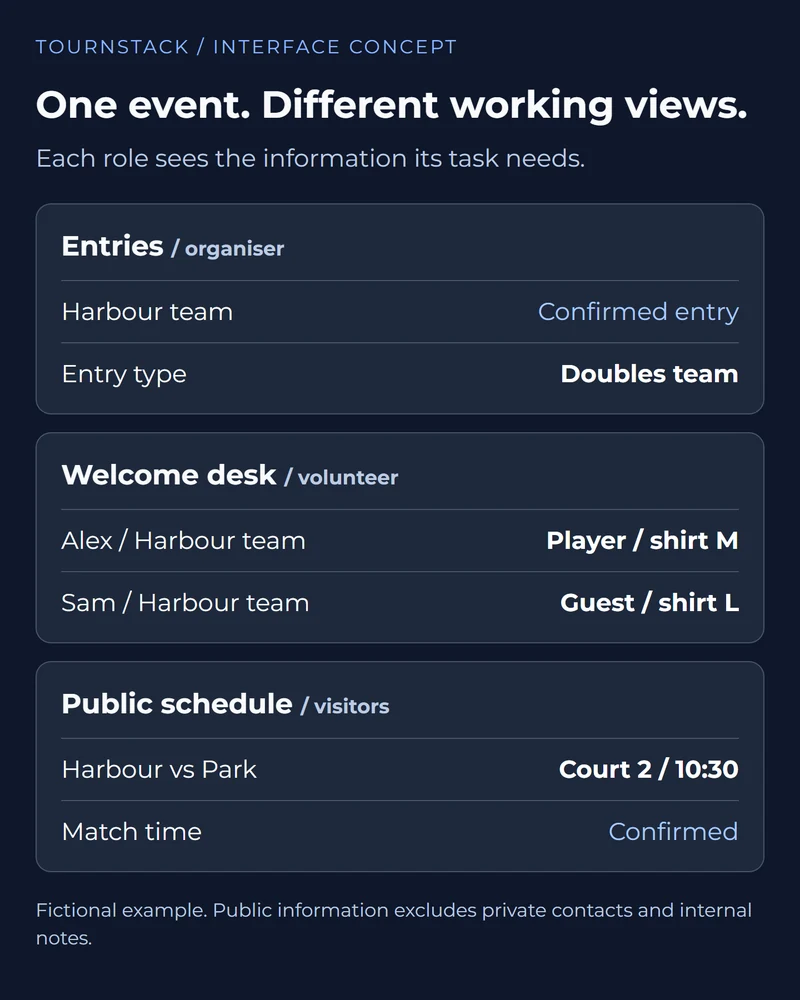
The useful connection depends on the detail. A shirt size helps the welcome team prepare an item. A player or guest status helps distinguish someone entered to compete from someone attending. A team contact gives the organiser a route for information that the team needs to receive.
These records do not all need to contain the same fields. The people preparing shirts may need names and sizes; someone publishing a match time has a different job. Start by explaining what each list or view is for. Then decide which information it needs and who maintains it.
This also helps when evaluating tournament registration software: follow what happens after the form is submitted, as well as how the form looks.
Start with the detail that changed
Write down the specific change and whether it needs a decision before another task can continue. A corrected email address, a withdrawal and a revised match time each start a different chain.
For a contact correction, you might need to update the registration record and check the recipient used for the next message. A withdrawal requires more thought: is the entry confirmed as withdrawn, is a replacement allowed, and who decides what happens to the competition?
Keep the request separate from the decision. If a team asks to change a match time, the request alone does not make a new time official. Anyone helping with the event should be able to tell whether the change is being considered or is ready to share.
A short note can be enough: what changed, who confirmed it and which tasks still need attention. The format matters less than making the status understandable.
Decide who needs to know
Identify the people affected and what each needs to do with the update. A team contact, an official and a volunteer may need different parts of the same information.
Consider a revised start time. The teams need to know when to be ready; the person allocating the court needs the updated booking; someone welcoming arrivals may need to direct people differently. A spectator checking the public schedule needs the confirmed time, without the internal discussion behind it.
Avoid making one large message carry every organising detail. State the action, the relevant time or place and where people can check the current information. Keep private contact details and internal notes out of public updates.
Choose the communication route for the situation too. A corrected page may be enough for information people will check later. A change affecting someone already at the venue may need a direct message or conversation.
Find every place the update belongs
List the records, displays and messages that depend on the changed detail, including copies already shared. Assign a person to check each relevant destination.
This is where an event workflow can become harder to follow. The registration record may be correct while an exported spreadsheet, printed list or earlier email still contains the old information. Updating the original does not automatically correct those copies.
Choose an authoritative record for each kind of information and make its role clear to the team. When someone is unsure about an entry or a match time, they should know where to check and who can resolve a discrepancy.
For copies that cannot update, plan the correction. That might mean replacing a printed schedule, marking an older version as superseded or sending a clear update to the affected people. The aim is to make the current answer easy to identify.
Follow a team withdrawal through the event
Consider a hypothetical team withdrawing before the fixtures are final.
First, the organiser confirms the withdrawal and decides what the competition arrangements allow. A replacement might be possible, or the planned format might need reviewing. Until that decision is made, the person preparing fixtures needs to know the entry list is still changing.
If a replacement is accepted, update the entry status and team details, then give the person preparing fixtures the confirmed list. Check that the new contact receives the relevant information. If no replacement is accepted, confirm the remaining entries and review any consequences for the format before finalising fixtures.
Then look at what has already left the organising workspace. Does a volunteer have an earlier list? Has a welcome message gone to the original team? Has a public schedule been shared? Each answer identifies a follow-up to complete or deliberately rule out. Record who will handle it and how the organising team will know it is done.
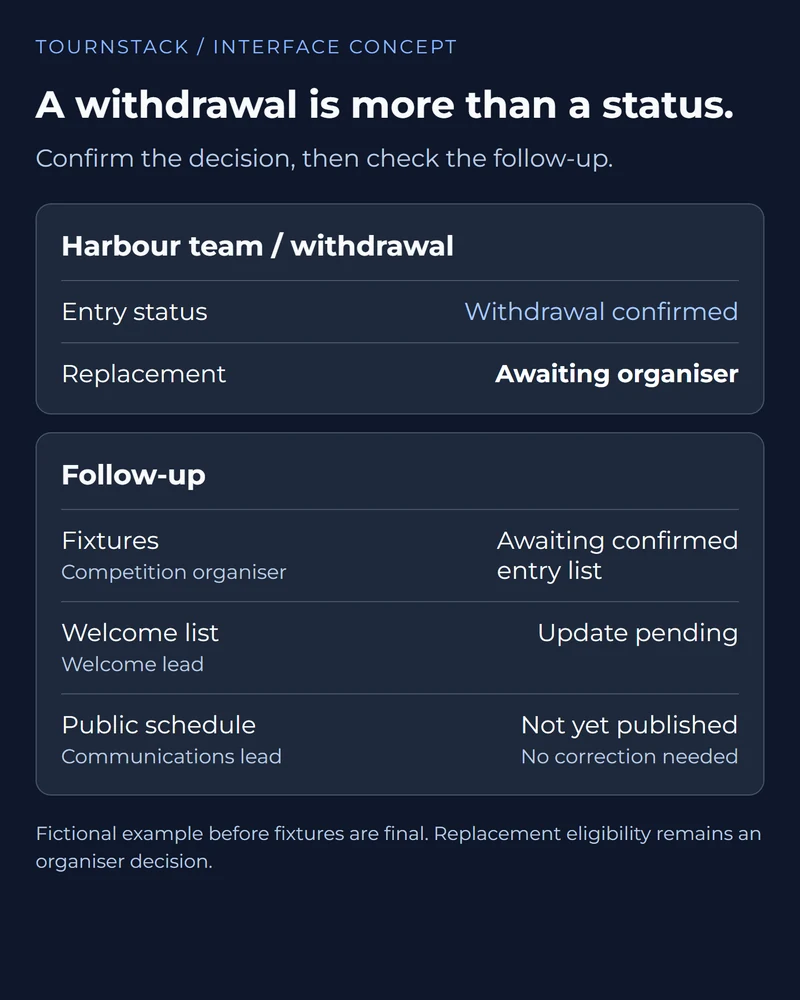
The three questions make that chain visible. They also reveal work that currently depends on one person remembering it all.
What should the organiser still decide?
The organiser should retain decisions about the event, including eligibility, replacements, competition arrangements and when a change is ready to share. Software can support those decisions by making the information and outstanding work easier to follow.
Routine work is a separate question. A configured registration confirmation has a defined trigger; deciding how to handle a withdrawal depends on the competition's arrangements and circumstances. Describe those responsibilities separately when discussing automation with a software provider.
Maintaining the record and helping people act on it are also different tasks. A published update cannot tell you that everyone affected has understood it. When the timing matters, decide how you will confirm that the relevant people know what to do next.
The right process leaves room for that judgement. It should help the organising team understand its responsibilities and carry them out with the information available.
How this shapes TournStack
We are developing TournStack around guided setup, simple event control and connected information for tournaments and leagues. The purpose is to reduce repeated administrative work so organisers have more attention for the people taking part.
Our Tournament Wizard guides initial setup, with a ten-minute goal. We are building it to explain supported sport and format choices, create registration forms and prepare configured event emails. The organiser supplies the details, reviews the settings and remains responsible for decisions during play.
Our vision for TournStack connects that preparation with event control, relevant public information and configured communications. The FAQ on running an event explains the intended organiser workspace and public views.
TournStack remains in development. We need to test complete workflows, including corrections and handovers, and confirm available sports, formats and features for each pilot or release. The ten-minute goal is not a measured guarantee for every event.
Make one change easier to follow
Choose one recurring change from your next event and trace it through the people and information it affects. Give any unclear decision or update a named owner. Then ask another organiser to find the current answer, identify what is still pending and explain who acts next.
That gives you a concrete basis for improving your current process or assessing new tools. A useful improvement is one the team can understand and repeat, leaving more attention for welcoming people, supporting volunteers and running the competition.
If you would like to discuss that workflow with us, tell us about your event.